The Adventures of Systems Boy!

Confessions of a Mac SysAdmin...

ScreenFlow and Opacity Redux

Friday, February 22, 2008
I recently wrote some criticism of a couple very promising new applications: ScreenFlow and Opacity. Both these apps came out at roughly the same time, and each was of particular interest to me. Each also had some pretty glaring bugs.

One of the great things about being a member of the Mac Community is that it actually is a community. Loosely, It's a group of people with similar interests and ideas about the computing experience. And Mac software developers — perhaps more than anyone — feel keenly this bond. At least the good ones do.

So, in true Mac Community fashion, shortly after my initial reviews (like, the next day) I got comments from the developers of ScreenFlow and Opacity. And those comments basically said, "Hey, I addressed the bugs you mentioned, and have released an update to my software. Check it out!"

I have checked it out. And it is good.

Unfortunately, I don't have time to do a complete review of these products. And I'm sure that someone more qualified will beat me to it in any case. But I did want to mention a few things about each.

ScreenFlow
ScreenFlow is a revolutionary approach to screen capturing and screen-based presentation. It is a complete environment for creating computer-screen-based presentations, in fact, letting you capture both your computer screen, its audio, and the video and audio from an external camera all at the same time. ScreenFlow then drops you into a very elegant editing mode that allows you to do all sorts of tricks specifically designed for screencasts (the Callout Actions are particularly nice).

I had a few problems with the 1.0 version, but I'm happy to report that the latest update, v. 1.0.1, fixes them all. I've been playing around with it a lot, and I can't say I've really had any problems at all, at least on my home machine. My work machine sports a 30" monitor, however, and ScreenFlow has problems with its native resolutions. The good news is, it says so:


ScreenFlow Alert: Better Late than Never
(click image for larger view)


The bad news is that this alert comes up after you've captured your too-big screen. Still, it's absolutely crucial information, and this alert is better than the nothing we had in version 1.0. I'll take it.

Otherwise, ScreenFlow has been a complete joy to use, and I do anticipate buying it for our lab at some point, probably in the summer. I've even showed it to my boss, who was duly impressed.

If you're looking for such a beast, ScreenFlow makes all the others I've tried pale in comparison.

Opacity
Opacity is a graphics app dedicated to creating, editing and outputting screen graphics — for the web, applications or desktop icons. As an occasional icon creator I can tell you, something like this has been a long time coming. In the past I've used a combination of Illustrator, Photoshop and the IconBuilder plug-in for Photoshop to create icons. Opacity costs only slightly more than IconBuilder, and it doesn't require Photoshop. In fact, it doesn't require anything. It, like ScreenFlow, is a dedicated environment for doing one thing. Unified, task-based apps like this are all the rage right now, and I for one think it's great.


Opacity Interface: Simple and Specific
(click image for larger view)

Opacity is more personally interesting to me than it is something we'd need for the lab. It's also something I need more time to explore. ScreenFlow is almost instantly intelligible. But Opacity will require a bit more investigation on my part before I decide whether or not I need it. Since many of my icons are hand drawn with a Wacom, I'll need to investigate the level to which this will be possible in Opacity.

But there are two things I want to point out about Opacity. One, I like the idea of it very much, and I think it's actually fairly novel on the Mac. I'm sure professional icon designers are loving that this exists and that it might actually turn out to be good. Two, it seems to be a very well-though out application. I think icon design is actually a much more complex task than screencast recording. But Opacity strikes a really good balance between the complexity of the task and a clean, elegant UI. It might not be right for me in the end, but if you design computer graphics of any kind, you should certainly take Opacity for a spin.

Oh, and one other thing about Opacity I'd like to mention: Its latest version (1.0.1) resolves every issue I mentioned in my initial article.

So, my thanks to the creators of these fine applications. Not only have they made what look like a couple of really neat apps, but they've handled initial criticism with the aplomb worthy of a Mac Developer.

Great work, guys!

UPDATE:
Testing of Opacity continues, and not without issue. The program is a good deal more solid than it was in version 1.0, but, for the record, attempting to import very large Illustrator documents causes the "Out of memory" alert to rear its ugly head once again. This alert will cause the application to quit. And, unfortunately, the default behavior of Opacity is to open the previous document on launch. If that document happens to be a large Illustrator file that causes the alert and subsequent quit of the program, you will be unable to successfully launch Opacity without moving the offending file. Bummer.

Also of note, Opacity is not currently pressure-sensitive when used with a Wacom tablet, which may be a bit of a problem for some — myself included — though perhaps not a deal-breaker. I'm certainly not averse to creating line-art in pressure-sensitive programs (like Illustrator) and importing them into an app like Opacity if it beats my previous workflow. But obviously this won't work if the Illustrator file essentially kills Opacity.

In any case, like I said, this is all for the record. I still feel Opacity has great potential. That's why I'm testing it so rigorously.

Labels: , , ,

ScreenFlow

Sunday, February 17, 2008
Holy poo! ScreenFlow is one of the nicest, most polished, yet useful applications I've seen a really long time.

On the surface, Vara Software's ScreenFlow appears to be just another in a series of applications designed to capture your computer screen to a Quicktime movie as you work. Typically such captures are then used for demonstration purposes for new products, or workflows, or videocasts, or what-have-you. But ScreenFlow is much more than just another screen capturing app. ScreenFlow is really an entire environment for creating and finishing computer demonstration videos.

And it's gorgeous!

The most obvious thing that sets ScreenFlow apart from its competitors is the fact that, along with the computer screen, it can capture iSight (or DV camera) video and audio at the same time. By default it sticks this video in a reduced-size window in the lower right hand corner, though, as you'll discover, this can easily be changed. That's because ScreenFlow, in addition to being a screen capturing application is also a presentation editor.


ScreenFlow: Capture Screen and Camera
(click image for larger view)


Once you've captured your computer screen actions and your iSight video, ScreenFlow presents you with an editing interface. Here you can perform all sorts of actions, including zooms, pans and something called "Callout Actions," which allow you to highlight specific windows as well as the mouse cursor. Vara has a nice demo of this feature (in a video, of course, which by the way, is where I pulled these screen shots from) on their site. But the application is so smart and well thought out, that if you've ever used a screencast app, you'll find the learning curve incredibly gentle.


ScreenFlow: Edit Your Presentation
(click image for larger view)


I do want to point out that this is a 1.0 release, and I have experienced numerous bugs. On my work computer (a Quad Intel box with copious amounts of RAM), the application completely crashes my machine. Force quit will not rectify the crash; a hard reboot is required. On my home system (an 8-core Intel with 2 GBs of RAM) ScreenFlow functions well enough, but there are still problems. The iSight registers video and audio in the setup screen, but no audio gets captured for some reason. Also, when exporting my final product to DV-NTSC, I was presented with a set of options, one of which was "Letterbox Content." Though I checked it, ScreenFlow did not honor the "Letterbox Content" option, and my movie came out squished. In fact, I exported the same movie without the box checked and there was no difference between the two movies. Clearly this function is broken. Clearly, ScreenFlow has some kinks to work out.

Still, once the problems are solved — and I sincerely hope that happens soon — ScreenFlow is poised to be the application of choice for regular producers of screen-based videos. And beyond. I admit, I don't do a lot of screen-based capturing, but I'm starting to wonder if the reason is because there haven't been any great apps out there for doing it. ScreenFlow is one of those apps that gives you ideas. It instantly makes you want to use it and then you start thinking of ways to do so. Being in education, this has been pretty easy for me to do. Something tells me I'll be buying and using ScreenFlow in the very near future.

UPDATE:
Version 1.0.1 has just been released, and it seems to fix at least some of the problems mentioned above, in particular the iSight audio problem. Expect a re-review sometime in the near future.

Labels: ,

Apple, Wonka, Steve and Willy

Tuesday, September 12, 2006
At this point I'm surprised no one's ever made more of the analogy, but a quick (very quick) Google search reveals few comparisons to Apple and the mythological Chocolate Factory of Willy Wonka fame. And yet, the similarities are striking: a large, secretive, highly prestigious company that produces the best, most innovative products almost as if by magic, and that is heralded by an eccentric but extremely charismatic leader. In fact, substitute computers for candy and you'd be hard pressed to tell the companies apart. You start to wonder if, perhaps, Jobs was, himself, a big fan of the 1971 Mel Stuart masterpiece in his youth.

Today's presentation is exactly the kind of thing I'm talking about. A big, huge media event, shrouded in mystery and hyped so expertly that candy lovers can barely contain their excitement. What will today's announcements bring? The Apple-faithful crowd around the virtual castle doors for the answer to that question.

The first thing on today's agenda was new iPods. Is there a more candy-like Apple product? I think not. Why, the shuffle was once even compared to a pack of gum, though the new model is now too tiny for such a comparison. And now we have colors — candy colors you might say — for the nano. Again. Whoopee. But I know a lot of people will be thrilled — literally thrilled — about this update.

The iTunes application itself is also apparently getting a facelift, both visually — in the form of multiple views, including a cool-sounding cover art view — and functionally — in the form of synchronization between computers. Can I just say? Finally! This has been the major reason I've never used an iPod. I may just have to start. Video in iTunes is now apparently higher resolution, which would seem to compliment the new iPod's brighter screen. And the "One more thing..."

Which would be, of course, movies. Movies are now available for purchase and download from the iTunes store in the new iTunes 7. Currently, Disney, Pixar, Touchstone and Miramax are the only studios offering movies on the iTunes store, but I'm sure more will follow. The image is purported to be "near-DVD quality" and audio is Dolby Surround Sound. Nice. Movies are priced in the $9.99-$14.99 range, which ain't bad.

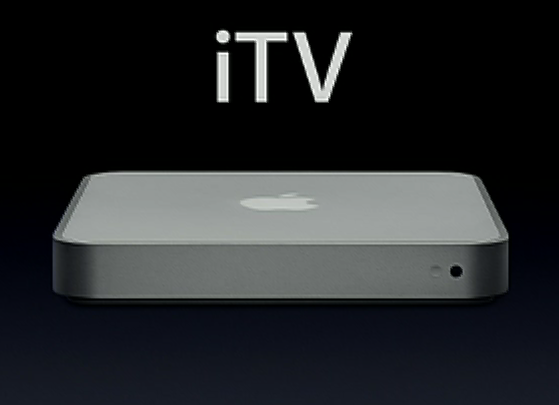
Perhaps not as Wonka-esqe as one might have hoped, but still, I'd say these are some pretty exciting and even significant advances for Apple's push in the consumer electronics and entertainment market. It's a gradual push that seems to come incrementally — probably never as fast as anyone would like — but Apple is great at this stuff, and they only seem to be getting better. And today is another baby step in the right direction. I'm still looking forward to things like an Apple-crafted cell phone. Or a media center — which, it now looks like, is in the works for release in the first quarter of 2007, and which would be about half the height of the Mac mini (wow!) and feature "wireless component video" over 802.11, optical audio and HDMI ports, and analog RCA audio ports, and which will work with Mac or PC, according to a very rare sneak peek at today's event. Now that's pretty exciting.


Codename: "iTV": Apple's Sneak Peek at Their Upcoming Media Center Hardware
(click image for larger view)


So yeah, I'm still looking forward. But if there's anything that Apple makes me do better than any company out there, it's just that: look forward. And that really is half the fun.

Now let's let those Oompa-Loompas get back to work, shall we?

UPDATE:
I just got done watching the stream, and today's event was, really, one of the most impressive presentations from Apple I've seen in a while. Not only were there a plethora of exciting and significant product updates, but we got a rare glimpse into a product that's still under development, and that looks quite ingenious. I wanted to quickly share some additional observations on what I saw in the broadcast, particularly with regards to iTunes 7 and "iTV".

On iTunes 7:
Some quick thoughts on what is probably the most important development in Apple's media — nee music — manager.
  • This is a significant overhaul of the iTunes application, but still — in true Apple fashion — appears to leave all the things that make iTunes such a great media player and manager.
  • Both album view and cover flow are wonderful implementations of a concept that's been brewing for sometime – the visual searching of media. Such a basic idea, and just the kind of thing that has made Apple synonymous with ease-of-use. And it's beautiful, of course.
  • iTunes 7 allows any user with an iTunes account to get free album art, even for albums not purchased via the store. This is great news for folks like me, who tend not to buy via the iTunes store, and it's great for the Apple/iTunes/iPod brand. One more reason to go with Apple products, even if you don't use the store.
  • The "Music" has been stripped from the iTunes Music Store. It's now just the iTunes Store. One wonders if they'll somehow figure out a way to get rid of the "Tunes" in iTunes without mangling the brand. Can you say MacBook?
  • Video purchased from the iTunes Store is now at a resolution of 640x480, which I realize I mentioned before, but I feel that's quite a significant improvement. And probably necessary to convince folks to fork over $10-15 bucks for movies.
  • iPod synchronization and management looks much, much smarter and includes sync-management and software/hardware management. Nice! It's good to see that Apple doesn't let their significant market lead in this area keep them from adding great new management features. As long as they keep up like this, they'll remain on top.
  • iPod Auto-Sync also looks immensely cool. I only hope it works for tracks ripped from CD as well as those purchased from the iTunes Store.

On "iTV":
Thoughts on the newest Apple non-computer electronic device. Possibly the most exciting thing since the iPod.
  • This looks like another great implementation of a really interesting idea.
  • I was surprised that they chose to go with a connector box that ties your computer in to your TV, rather than a separate box, but after the presentation, I really think that's the way to go: integrating existing components, tying it all together. Brilliant!

iTV Concept: This Graphic Says it All
(click image for larger view)


  • It also looks like it should be fairly easy to set up.
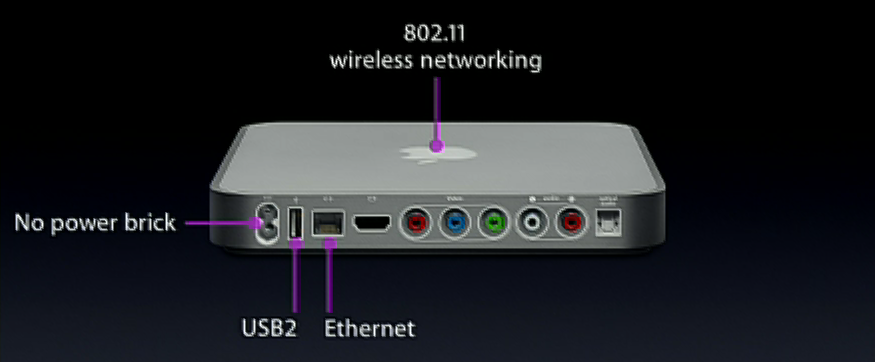
  • Video trailers are streamed live off the internet, thanks to 802.11 wireless connections on the box. Neat-O!

"iTV" Data Ports
(click image for larger view)


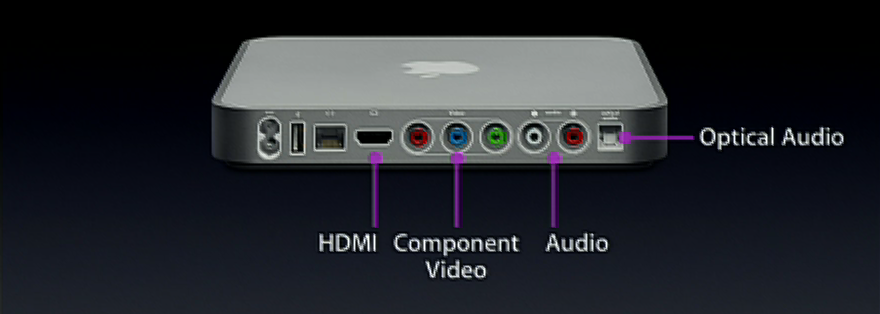
  • And sent to the TV via a variety of video port options.

"iTV" Video Ports
(click image for larger view)


  • It begs the question, though: Is this a cable killer? Or will the reverse happen?
  • But for $299, it'll be hard not to get one.

"iTV": A Bargain at $299
(click image for larger view)


On Steve Jobs:
A couple quick final thoughts on the man himself.
  • Mr. Jobs looks healthy again, at least compared to how he looked in the Developer's Keynote. His presentation was as riveting as ever. Nice to see.
  • Jobs thanked quite a few people, including his software, hardware and development teams, and, of all things, artists. Also nice to see.
  • Jobs, at one point in the presentation used the term "The Sexy." Which was just a little weird to see. For me anyway.

So anyway, some pretty exciting stuff, I must say. One of the best Apple presentations I've seen in a long time. And three (count 'em, three!) "One more things..." Ya gotta love it.

Labels: , ,

Video Compression for the Web: A Basic Primer

Sunday, August 20, 2006
Recently I've gotten some questions from clients (and for years from students) regarding the best method for compressing video for posting on the web. While the technology of video compression is always changing, and doing an article on what exact settings and CODECs to use would be dated in the next year or so, there are some basic rules and concepts to consider when compressing video, and so I thought I'd jot some of these down.

This post will deal with non-streaming movie creation using Quicktime Pro and its included CODECs. I'm not into all that DiVX stuff, nor am I into other proprietary formats. I am a lazy cheap-ass. Nevertheless, the basic tenets discussed here should apply to most web-video situations. If you really don't want to worry about all this, your best bet is a YouTube-like solution. But if you're interested, here's what I know.

The Basic Idea
There are two basic goals of compressing video for the web, and they are intertwined: maintaining the highest quality and finagling the lowest file size. So, at the heart of it all, you are considering file size and quality, and the relation between these two factors.

CODECs
The CODEC (COmpression-DECompression scheme) that you choose is hugely important to the quality and file size of your video. Each year more efficient CODECs appear on the scene. This is great news for would-be video posters, but it does confuse the issue to some extent. I won't go into a lengthy description of the various CODECs available as it would only be obsolete by year's end. I will say that, generally speaking, the newest video CODECs for web compression are usually the best, but they also require the latest version of the media player in order to view them, as you'll soon see.


Quicktime "Options" Window: Select a CODEC and a Frame Size
(click image for larger view)


A brief breakdown of the latest and greatest CODECs for the web:

  • Sorenson 3
    The venerable Sorenson 3 CODEC has been around for years. It's fairly efficient, creating reasonably small videos at reasonably good quality, though motion and transitions are usually very blocky. It's compatible with Quicktime 5 and later, so if you need to reach the widest possible audience, Sorenson 3 is a good bet.

  • H263
    This is the same CODEC once used by default in Quicktime Broadcaster for streaming live video. It's a very nice CODEC. File sizes are dramatically smaller than Sorenson 3, and the quality is comparable. I find that H263 enhances contrast a great deal, though, so in some ways it may not look as good as Sorenson 3, but it still holds up fairly nicely. And transitions look better in H263. H263 is compatible with Quicktime 6 and up.

  • H264
    This is one of the latest and greatest CODECs. H264 is a variant of MPEG-4 (know as MPEG-4 Part 10 in some circles) and is very similar to the MPEG-2 CODEC used for DVDs. But H264 is twice as efficient. That is, H264 can deliver twice the image quality for the same file size as MPEG-2. Or, put another way, H264 can deliver video equal in quality to DVD at half the size. Twice as efficient. Get it? H264 (or some variant of it, maybe, I forget the details) is planned for use on HD DVDs. But it's also a great web CODEC. Just remember, it requires Quicktime 7 or later to encode and view.


Quicktime CODECs: So Many from which to Choose
(click image for larger view)


What to Consider
After you've chosen your CODEC, and depending on what that CODEC is, you will have numerous options and settings from which to choose for creating video of optimal size and quality. What is "optimal" for you will depend on your particular circumstance. If you have file size restrictions, that will obviously come into play. And you surely have quality requirements that are unique to your situation and aesthetic values.

Despite the huge number of settings available for the various CODECs, there are really only a handful that are of utmost importance when encoding video for the web. They are:

  • Frame Size
    The number one way to reduce the size of your video is to reduce the frame size — that is, the actual size, in pixels, of the image. Standard DV-NTSC video has a frame size of 720x480. Cutting this in half will drastically (by half, in fact) reduce the size of your video file. Yet 320x240 is still plenty big by web standards. If necessary, you can go even lower.

  • Frames Rate (fps)
    The frame rate (or frames per second) setting refers to the number of video frames that will play each second. (Really. I swear.) Adjusting the fps can greatly reduce the file size, yet has little appreciable affect on video quality. In fact, the video image itself goes unaltered. When reducing fps, frames of video are simply removed. Playback will be a bit less smooth than normal, but this is generally considered acceptable when it comes to web-based video. Reducing fps to around 12-15 can give you huge reduction in file size. You can even go as low as 10 fps and still have things looking pretty decent.

  • Quality
    The quality setting refers to the amount of data removed from each individual image in your video, each frame. This affects the overall quality of the video the most, but also has a significant affect on the file size, and is the setting that requires the most care. High and medium settings are usually pretty good looking; things tend to go steadily downhill from there, but maybe not so much that it is a problem for your particular situation. You'll need to judge for yourself here.


H264 Settings
(click image for larger view)


Do a Test; Do Some Math
That brings me to my sagest piece of advice on this topic: Do a test. Seriously. There's no way for you to figure out the file size-to-quality ratio without testing it out a bit. There's no set standard. I recommend copying a minute-long section of your video project to a new Quicktime movie and testing with that. Testing on a minute-long clip will make the math easier for calculating the size of the final file, but you really could use any length if you're not afraid of the math. You're just trying to get an average (which is really all you can get anyway, as web CODECs are generally variable bit CODECs whose output will vary in size depending on the type of images in your video). So take your minute-long test clip and export it using a variety of settings. You can multiply the minute-long exports by the actual length of your final movie file to get a ballpark figure for the final file size. Find the best balance between these settings — the best balance of file size and quality — for your needs. It's a pain, but it's worth it. And don't forget to write down your optimal settings for next time.

So those are the basic concepts and settings to consider when compressing video for the web. Hopefully this helps someone out. If anyone has information to add to this topic, I'd love to hear about it in the comments section. I am by no means and expert on the subject and am always curious to hear people's experiences.

Labels:

Apple's Latest Product Announcements

Saturday, October 15, 2005
I must admit, this week's announcement of new Apple products really got me thinking. There was a lot there that I couldn't really conceive of until I finally saw it implemented: online TV distribution, The Digital Hub, and the Video iPod at last. This was almost more of a conceptual and marketing breakthrough than a technological one for Apple, and it's really interesting for me to see how they're starting, gradually, to implement these concepts. I just want to talk fairly briefly about my thoughts on some of the main ideas brought to light last week.

The first thing that struck me is that Apple is the best thing to ever happen to U2. That band is so lucky ol' Steve apparently has a hard-on for them. I mean, does an iPod announcement take place that doesn't prominently feature these has-beens? Has U2 written anything interesting in the last decade? I think the band is getting a lot more out of this deal than Apple at this point. But this is just a snarky aside.

Next, I think Apple has really nailed, or is very close to nailing, the online content delivery thing. They proved themselves with music, and now other media want in. Big time. And Apple is not only happy to provide, but I think they do a hell of a job. In some ways, Apple has become the intermediary in the ever-hostile relationship between producers and consumers. They make all that ugliness pretty, and not just on an aesthetic level. The pricing scheme vs. quality of the downloadable TV shows is about as perfect as I can imagine. I find myself wanting to download shows I've already watched and have on tape, just because I can, and because they're cheap. Seems like a great deal. And if I ever miss an episode of Lost, I'll be checking iTunes long before I ever suffer through the Hell that is BitTorrent. Again, because I can, and because it's cheap. The great thing about a service like this -- the thing that Apple realizes -- is that the point of your two bucks is to bypass the hassle of the free alternative. It's the same reason I buy DVDs instead of stealing them: It's easier and the price is reasonable. Why do people still steal music? I'd argue it's at least partly because it's easier to do so, and the price of music is unreasonable. I mean compare: $1 for a 4 minute song vs. $2 for an hour long show. Someone is getting screwed in the music model. Three guesses who. That's why people steal music so much more readily than video. The downside to all this is the DRM, which I'm pretty sure works just like the DRM for music. I understand the reason for it, but I still think it's a pain in the ass. And, as I've just pointed out, the greater the pain-in-the-ass factor, the greater, in some ways, the motivation to steal. As long as the DRM is less aggravating than the stealing process, there's value added and folks will pay. But someone needs to come up with a better DRM model if they really want people to pay money for stuff they get on TV for free. Other than that, I don't have much to say about it.

The new iMac seems to be the first real, tangible iteration of the "Digital Hub" idea. If I could replace my aging stereo, TV, VCR and DVD players with this one device, I'd plunk down my fourteen hundred clams right now. Alas, the big caveat: no ability to record. You can't record anything from the TV. Again, I understand the reasoning here, but it's a deal killer for me. It's too bad, too, because it looks like they've done a brilliant job with the remote and the Front Row interface. But without the ability to record content, it's just a big, fancy, pretty DVD player. I think this is coming though. I think what we're seeing here is, like I said, the first iteration. Apple likes to seed an idea or a part of an idea before they go for broke. That's what I think they're doing with the iMac and Front Row. Just like they did with the iPod Photo, they're whetting our appetites for more, and giving us a gentle cushion, of sorts, on the future. Letting you envision the logical next step and get ready for it, psychologically.

Finally, the iPod. Not the video iPod; just the iPod (that now does video). Actually, it's important (to me anyway) to note that the iPod only plays video. And apparently, from the lack of firewire capability, that's all it will ever do. I can't say I'm surprised by this, though I'll always long for my own personal vision of what the Video iPod could (should) be (have been). Nevertheless, it is not to be. Still, the new iPod looks cool. It's another well-implemented idea, with much more potential than I would have imagined. Combined with downloadable content at reasonable prices, the iPod becomes a whole new entertainment device: Want to watch a movie with some friends? Download it, put it on your iPod, and head over to their house. Hell, put ten movies, a couple TV shows, and a party mix on your iPod, and you're set for a whole weekend of media fun. As a video teacher, I can see the potential for putting all the videos I use as demos on an iPod, and never again worrying about whether I have this DVD or that for class today. In short, I think video adds a social dimension to the iPod, where before it was quite the opposite. I'd imagine most people will not look at video on the device itself as they travel to and from work. Rather, I imagine they'll plug it in to the TVs of friends and watch movies and shows with other people, but in a much more convenient and portable way then they ever did before. It's a neat idea, and I'm very tempted to get one. That said, the lack of firewire bothers me. I'm a firewire guy. I do a lot of video work, and I need firewire. If I were to get one of these puppies, firewire would be sorely missed. Also, the type of video you can watch on the iPod is very limited. And unfortunately, said video looks like pure ass on a full-sized computer monitor. I don't know how bad it looks on a TV, but, apparently -- and I find this somewhat disappointing -- downloadable video content is only made to be viewed on an iPod. I, again, have a feeling this will change over time, and that we will see quality options for our downloadable video content sometime in the near future. But for now they are seriously limited.

Ah well. The Apple giveth and the Apple taketh away.

I don't own an iPod, and I never have. Almost everyone I know does, but not me. I'm a huge fan of Apple, but more for their computers. Yet, for the first time, I find myself tempted by the latest iPod. (Add video to something and that will tend to happen to me.) This is saying a lot. I think this latest batch of products shows, more than serious technological leaps, real conceptual breakthroughs in terms of the marketing and management of purchasable, viewable, online media, and the relationship between the producers, the consumers and the device. I, for one, am glad Apple is at the helm of this... Is it too soon to say, "revolution?" Yeah, probably.

Other Articles of Interest:
Daring Fireball Article
Subtraction Article

Labels: , ,

A Video iPod I'd Buy

Wednesday, August 10, 2005
I don't have an iPod. It's true. Frankly, I don't really have much interest in listening to music anywhere other than the comfort of my own home. When I listen to music, I want to sit there and actually listen to the music, not catch a bus or ride the subway or eat lunch or work out. (Yeah, like I work out.) And I hate earbud-style headphones.

There's been a lot of talk about the idea of a Video iPod for some time. As much as I'm disinclined to listening to music on-the-go, I'm even less interested in watching videos on-the-go. Particularly on a little, tiny, 2.5 inch LCD screen. Somehow I just don't think The Exorcist or 2001: A Space Odyssey would have the same impact, however titilating the idea of carrying around movies in your pocket might seem. And Steve Jobs would seem to agree. And so, for the longest time, the Video iPod has been tabled.

Fine by me.

Not too long ago, however, Apple came out with the iPod Photo. Now the iPod Photo is kind of a neat idea, though I doubt it would appeal to many people. The basic idea is that you can carry around photos and show them on your iPod. But what really takes this to the next level -- and by that I mean the potential of a Video iPod -- is the device's ability display photos on a television. Now we're talking. And I'd posit the theory that that's the real motivation behind the iPod Photo: to get people to wrap their brains around the idea of the iPod as a convergent device, one made to work with other media appliances in the home. Rest assured, if we do see an iPod video device -- and I think it's pretty likely at this point -- it will connect to your TV.

That's right, folks. You heard it here first.

Now to be perfectly honest, while this is a nice idea, I'm still not satisfied. Sure, there's a certain appeal to a bringing an iPod to a friend's house, plugging it in to his TV, and choosing from a list of movies to watch, all from a device that fits in the palm of your hand and operates on batteries. In fact, I like this idea a lot. But it's not a deal maker for me. I'm not sure it's something I want to pay hundreds of dollars for. Lots of folks will, but probably not me.

What will it take? Okay. I will tell you.

In addition to the iPod media player, Apple also makes a audio-video capture device. I'm sure you've heard of it. It's called the iSight. The iSight is a fabulous creature. It's essentially intended as a webcam. Unlike most webcams on the market, however, it captures audio and video via firewire rather than USB, and is therefore capable of producing some pretty decent looking, fairly high quality video. I have one and I love it. It's got a very grainy quality, and a nice saturated color palatte. It also produces deinterlaced video, so it has something of a film quality to my eye, though other things about the video it produces are distincly digital. Say what you will, the look is unique, and I think it's quite beautiful. Unfortunately, the iSight is hobbled out of the box. It's really only made to work with iChat, the video conferencing software made by Apple. You can get third party software, like the excellent BTV Pro, to take full advantage of the iSight, but there's nothing from Apple. Which is too bad, because in my humble opinion, the iSight is capable of so much more.

Enter the Video iPod.

For awhile now, I've envisioned a combination of these two ingenious devices. I've longed for an ultraportable video capture solution, and a Video iPod with iSight capture integration would more than fit the bill, provided, of course, the device allowed for full-frame, high-quality captures (or something close to it). Imagine: you've got your iPod, and you decide you want to capture some nice, decent looking video of you oversized poodle in Central Park. Don't have your video camera? No problem. Just whip out your iSight, plug it into your iPod, click record and go.

Sweet!

So far, Apple has shied away from the iPod as a capture device. Add-ons can be had to record audio to the iPod, but as far as I know, photos could never be captured to the iPod, and nothing in the realm of media aquisition directly to the iPod has ever been produced by Apple. So I really wonder if this is something Apple's even thinking about seriously. I worry that it isn't. But I will say, right here, right now, that if Apple (or anyone, for that matter) were to produce such a device, I would buy one in an instant. In a heartbeat. In a New York minute.

Hell, I might buy a couple.

Labels: ,

On Another Topic Entirely...

Friday, August 05, 2005
Hey, so here's a post that has absolutely nothing to do with operating systems whatsoever. I'm so psyched.

(And yes, this will be a rant.)

First off, let me say, I'm a huge Final Cut Pro fan. I use it in my work, I teach a class in it, and I use it for personal projects. I've been using and loving it since version 1. In the school where I've worked for five years, I've managed to evangelize so effectively on the part of Final Cut, that when I started working in my department, Media 100 was the dominant editing software in my department, and now it's Final Cut across the board. I love it like an old friend. I feel that level familiarity with it. And I'm proud to be a Final Cut user.

That said, there's a feature I've been longing for in Final Cut Pro for quite some time now. I know I'm not the only one: I took a survey at some online FCP forum, god-knows-how-long ago, and it was among the top feature requests. I also spoke to someone who is a beta tester for FCP, and he also said it was a very popular feature request, and that, "It's coming." I was pretty sure that version 5 would include my feature. But after downloading a crack of the latest version (my department still has not received any software, which will be a perennial theme on this blog) I found that this feature had again managed to be excluded. What's the feature, you ask? Simple: Per-project scratch disks.

I'll explain.

When you first open Final Cut, you are prompted to choose the location of your scratch disk. The scratch disk, in case you don't know, is the place where, most importantly, all your captured media, among other things, goes. Anytime you capture from tape and digitize footage into Quicktime movie files, they go into the folder you've chosen as your scratch disk, into a subfolder named after your project. Now this is all fine and good, but file management in Final Cut -- and in video projects in general -- can be a real bitch. You've got all your project files, and you've got all these media files, and they're all over the place. This is actually true in all sorts of workflows -- graphics, web, audio, you name it. And many applications include utilities for managing media. Quark's "Collect for Output" is a good example: It takes all the media needed for a given project and puts it all into one folder for easy transport to a printer or client or wherever you may need to take it. Final Cut itself has a similar feature, the Media Manager, that allows you to do much the same thing. In fact, most programs that rely on multiple media files spread across the hard drive have some sort of media management tool. Great. I like this.

Now back to my feature request, again: per-project scratch disks. This seems to me an obvious solution to at least part of the media management problem. I tend to keep all my projects in seperate locations. Makes sense, right? You want to look at items that have something to do with your "Great Big Humongous Boil" project, say, so you go to the folder "Great Big Humongous Boil," and there it all is. But if you're using Final Cut, it's not. In fact, a significant portion of it -- perhaps the main ingredient, the video clips -- are not there. They're in the scratch folder. Now for some people this is fine. I understand the desire to keep this media seperate from the projects themselves. There's a logic to that, and it's justified. But there's also a logic to wanting to keep the media together with the project. This is clearly something Apple is aware of, that's why they give you the option to consolidate all your media using the Media Manager. But if you know you want all your media and project files stored together before you even start a project -- and I know a lot of people who do -- it would be much simpler and smarter if we had the option to decide this at the outset of any new project, and it would save a whole lot of error-prone media management after the fact. Seems to me like managing your media from the get-go is usually the best way to go if you can swing it. And, by the way, Media 100 had this option.

So Final Cut 5 is out now, and still no per-project scratch disk setting. We've got all the new, admittedly great, productivity features. The real-time capabilties alone are simply phenomenal. But it's this one, tiny, little feature that would really mean the world to me. And I can't, for the life of me, figure why, after all this time, it's been ignored. As a user I would consider it a huge boon, and as a teacher of the software it would dramatically simplify explaining the scratch disk concept. (Do you have any idea the sort of confused-puppy stares I get when I tell students, "Your Quicktime movies will get stored in this arbitrarily determined folder on such-and-such a drive, but you should store all your projects in another place?") I suppose the obvious solution is to keep your projects all in the same Final Cut Pro Documents folder that the scratch disk is set to. But what if you have projects on multiple drives? Or what if you just plain want to organize things in a way that makes sense to you, rather than in the way that Apple has deemed it best you do? Since FCP 4, I could set the key command for wiggling my big toe, but I still can't set scratch disks on a per-project basis. This level of customizability just seems so basic that I'm left scratching my head over its exclusion.

I'm no programmer, but this seems like a very simple thing to implement on Apple's part. Way easier than multiple angles and intgrated LiveType. A ten minute job. And yet, it continues to fall by the wayside.

I'm bummed.

Labels: , ,